Pages

Friday, June 24, 2016

ISTE 2016 Bound: Let's Connect!

One of the 2 Techie Teachers is ISTE bound! Tiffany will be presenting the sessions below.  If you are headed to ISTE, be sure and stop by!

Are you among the #notatISTE crowd? Be sure to the follow the hashtag for learning from your couch!

For our #INeLearn friends, we will see you at the annual ISTE Meet-up!


Inspiring Critical Thinking in the Elementary Classroom

When I began my journey in sixth grade, I was CERTAIN I was going to be the hero of tech integration.  The master of creativity.  The queen of innovation.  What I quickly found out was that a) students are already tech savvy- they just need access b) creativity had been squelched from their academic lives and c) innovation isn't something you teach. It's something you inspire.

So I decided I needed to go back to square one and tackle one singular issue.  My students were simply content, and desperately wanted, assignments and projects that were fill-in-the-blank, multiple choice, and cookie-cutter. Thankfully, I wasn't quite as content to spoon feed them what they thought they wanted.

Injecting the 4C's (communication, creativity, collaboration, and critical thinking) in a classroom shouldn't be tricky.  It's really more a mindset change above all else.  Let me share with you how I go about the business of inspiring critical thinking skills within my classroom.

Answer a Question With a Question

For too long, we as educators have been the masters and keepers of content knowledge.  I want my students to see me as an expert, but not as the end-all be-all.  Teaching students to think critically about their questions and work is a great place to start.

My students were boggled at the beginning of the year when they would ask me a question and I would turn it back to them with another question.  For example, "Mrs. Copple how many photos should I have in my iBook?" My response, "Well Susie, what story are you trying to tell with your project? Do you feel what you have added so far completely tells that story?" The looks on their faces in August were nearly priceless, but by the end of the year I began to see them using each other as sounding boards more often and thinking more critically about their work before coming to see me.

Grant them Access to the World 

In a digital age, students should have free access to Google and YouTube.  When my own children (ages 9, 7, 4, and 18 months) want to know how to do something, they use one of the aforementioned tools. Then they will work diligently until they can resolve their issues.  Allowing students to freely search for answers using their favorite methods is so important.  This seems so simple, yet many teachers are afraid to let go of the "right" to dispense all knowledge within the classroom.
The amazing Sylvia Duckworth shows it best in this sketch-note. 
If you're looking for safe ways for your students to have access check out the following tools that will keep their curiosity in check.

Kiddle, KidRex, and Google Advanced Search

Kiddle and KidRex filter out most "junk" for younger learners.  Even K kids can perform their own research.  Teaching older students the skill of Google Advanced Search is a more critical skill and produces better results.

Applying STEM Regardless of Subject

Last year I taught a Social Studies/Digital Literacy split to sixth graders.  I was bound and determined to continue incorporating STEM education into my classroom! STEM is an amazing platform for putting students in the driver's seat of learning, and when that occurs critical thinking is at the forefront.  There is no greater joy in my classroom than when I see students think critically through collaboration to solve problems.  STEM also encourages perseverance through failure and promotes a culture of "we're all in this together."  The premise of STEM is to introduce the students a problem they must solve.  These problems are not easily solved through a quick search, but must show application of knowledge through the process of creation and critical thinking. 

For a full blog post about STEM, check this link HERE
Students are thinking critically about how to build a Roman aqueduct
that will provide their city with drinking water. 

Provide Learning Opportunities that Involve Creation

Anytime students are asked to create vs. fill-in-the-blank, you will get more authentic examples of their learning because students must think more critically.  There are literally dozens of creation apps I utilize in the classroom.  For a few of my favorites, check out this blog post HERE.

Practicing Reflection and Modeling Your Own

When there are no easy blanks to fill in, assessment is turned on its end.  In a classroom that embraces the 4C's, in particular critical thinking, it is important to understand that assessment comes through careful observation of the student through activities fueled by creation.  However, a key component to critical thinking skills requires the learner to reflect on their work.  Modeling and scaffolding reflection is a skill just as important to facilitate in the classroom as is reading and writing.  How do you model reflection in your own teaching?  Below I am sharing my favorite digital tools for reflection, but I also want to encourage the use of face-to-face reflection.  Sitting with your students in a circle and discussing what went "right" or "wrong" in a lesson/activity/project builds classroom culture conducive to critical thinking. 

This is sometimes a terrifying thing for teachers to do.  Admitting that we aren't perfect isn't always easy, but crucial in building relationships with your students.  Students are brutally honest.  Be prepared to take any and all criticism to heart!  The most important part; however, is to make an honest effort to make the changes discussed throughout the process! 

KidBlog

KidBlog is a safe way for your students to broaden their reflection audience to their peers.  I have my students blog frequently about their work on activities, their favorite parts of class, and their least favorite things I do!  Be prepared!

LMS Discussions

Our school uses Canvas by Instructure as an LMS (Learning Management System) and it has a great Class Discussions feature. I utilize this frequently because it's a quick and easy way to get student responses.  Students are also able to comment on each other's posts which makes it feel a little more like social media.  You can see the types of questions I might ask in a reflection and a student response. 

iMovie Reflections

By the end of the year, I began to take away standard reflection questions.  As part of scaffolding, I wanted to see how my students had grown in the reflection process.  I asked my students to create an iMovie that not only detailed the process of their group STEM challenge through photo and video, but to also provide reflection interviews at the end.  These turned out to be my favorite reflections of the year! 

Google Forms

Google Forms are simple, visually appealing, and provide great feedback for you the teacher.  Below you can see a project reflection form I had my students complete.  Building surveys is a snap with Google's easy format and there are a variety of ways to share the form with your students including embed code. Feel free to practice filling out the form! 


Get Out of Their Way

Lastly, in order for us to inspire critical thinking in our classrooms, we have to provide them the opportunities to shine.  Step back.  Let them struggle.  Think.  You'll be amazed with what they can accomplish!

-Tiffany 


Thursday, June 23, 2016

10 Apps that Fuel Creation with Technology Across the Content

If you're looking for the ISTE Poster Session materials for

"5 Value Tools for Literacy in the Elementary Classroom"  
the link is here!

http://goo.gl/5pFhOs


Recently we have been out and about on the summer professional development circuit.  We've been asked to share a few of our materials that we use during our presentations.  You ask, and we deliver!

Today's post shares information that is worthy of all ages, stages, content, and access.  Check out these easy ways to get your students CREATING in the classroom!
The amazing Sylvia Duckworth has created a perfect sketchnote that captures the essence of why students should create vs. consume in the classroom!  These are also some key reminders for us as teachers that creative people aren't always "perfect" and that should be celebrated!

It is our job as teachers to facilitate learning experiences that put students in the driver's seat. 

Tellagami allows your students the ability to customize the way they present 
or share information easily.  Super simple for students K and up.

ChatterPix is an incredibly versatile app that allows students to share 30 seconds of sound byte while making an image look as if it is speaking.  We use this app for every subject and grade level.  Students can show fluency, give basic retellings, tell math stories, and more! Really the ideas are endless once you've tried this app.

While this is technically a gaming based review tool, students can create their own Quizizz games in addition to playing teacher created ones.  It's a great way to assess a variety of skills and content knowledge.   Another option is Kahoot, but we like Quizizz for its student-paced fun.

GAFE is an ever-changing and growing set of apps compatible for those out there not ipad based.  The ability for students to simultaneously edit is key for collaboration.

Who doesn't love a fun stop motion project?  Lego Movie Maker has made creation super easy, but also helps students create very professional projects. We use stop motion for many projects including life cycles, math stories, and more!

iMovie is an easy go to tool for students to share their learning, reflections, book trailers, and so much more.  iMovie is truly a workhorse in our classrooms.

Sketchbook Pro for older students or DoodleBuddy for the little ones, but all whiteboard apps allow students to create and show their artistic side.  Whether students are sketchnoting, creating posters, drawing pics to make text-to-self connections...whiteboard apps can be very powerful when they are available on demand. 

PicCollage is another of those workhorse apps in our classrooms.  We like to take students on scavenger hunts (shapes, colors, nouns, etc.) and have them sort in PicCollage.  It works great for on the fly graphic organizers, meme creation, and so on. Students can personalize their creations with fun fonts, stickers, and more.  

This is hands-down our favorite app.  You can search our blog to find a few posts solely dedicated to this powerful app!

Hands-down the greatest part of a student's iPad is the camera.  It allows you to get a bigger picture of your students' learning as they photograph their work, video reflections, find real-world examples to sort, and more.  The camera is the crucial component behind every app mentioned above.  Use it! 

Happy creating!

-Tiffany


Wednesday, April 20, 2016

Digital Comic Books with Book Creator: Heroes of Exploration

Let’s face it.  There are pieces of content from time to time that lack the excitement and instant draw for students that other areas may elicit.  For me, our upcoming unit about explorers was making me feel pretty ho-hum. Walk with me as I show you how my sixth graders turned explorers into, “Heroes of Exploration.”

This is a video was created for the ISTE-TEN award process.  It gives a sneak peek into this project.  
The video earned 2nd place!
For this project, students were asked to create a comic book about an explorer using Book Creator. In this project, I wanted students to go beyond basic, boring, regurgitated facts about their chosen explorer to find the STORY behind them.  

Their audience for this project was a collection of elementary classrooms I had rounded up from my band of colleagues.  In the end, students were going to share their comic books via Skype and file sharing with kindergartners and first, fourth, and fifth grade students.  Creating an audience broader than our four walls gave the students a deeper purpose than creating a comic book for me to grade.  It turned an ordinary project into one that made them work harder, think more critically, and produce better products.  
Student Project Details and Resources
The students received the following in the form of an eBook in Book Creator.  
This made it easy to work completely within the app to find all of their 
project information and work.  

Adding comic book features is super simple.
Simply tap on the + sign! Hit "more" for even
more options to customize. 
Book Creator makes comic book creation incredibly easy for students of all ages.  The recent upgrade provides templates, stickers, comic fonts, and more in addition to its already great features. I loved seeing the students using other apps/programs to smash with Book Creator such as Sketchbook, Storyboard That!, ChatterPix, etc to illustrate their storyline.  Since Book Creator is an eBook creator, students do have the option to add video, sound effects, and more!  

The app even includes backgrounds that
add to the comic book's overall effect. 
Comic books are great for all content areas! My daughter's first grade classroom felt inspired by our comic books after our Skype session, and they made comic books about worms!  
These first graders liked our work so much,
they made their own comic books!


Below I have included photos of our Skype sessions as well as video (Book Creator has a great feature that exports the eBooks into video) of a great student sample. This student truly captured the essence of her audience while still maintaining a clear demonstration of content understanding. 

Enjoy!

We also shared our work with our
peers from down the hall.
5th graders listening to one of
our readers via Skype.


-Tiffany

Sunday, March 13, 2016

Teaching is Passion: 2016 French Lick Blogger/Teacher Retreat Recap


Passion is more than a fleeting emotion.  It's more than what drives us or carries us through difficult times.  It's just so much more than that.

Passion goes deeper.  It is a flame that both consumes us and ignites us to go beyond the ordinary to extraordinary heights.

In its consumption it can drain us- of time, energy, motivation.  We can become so passionate that it can discourage us to the point of defeat when we surround ourselves with those who don't understand our passion for teaching or when we begin to play the comparison game.

Yet, passion is a great ignitor. When sparked by the right circumstance and the right tribe of people, passion can allow us to feel stronger.  Braver.  Prepared to take on the unique challenges that face us every day we walk inside those classroom doors.

I feel ignited.  Renewed.  Reminded.  After an amazing weekend spent with 200+ dedicated teacher friends, it's hard not to feel ready to conquer the world!
200+ educators, librarians, coaches, and more gathered
to reignite their passion for the best profession on Earth!
For the third year in a row, Brittany and I have been blessed to be a part of an annual blogger/teacher retreat at the gorgeous French Lick Resort in the heart of Southern Indiana.  Holly Ehle of Kindergarten Connections (link below) is the grand organizer of this event, but she is much more than that.  It is plain to see her dedication not only to her students and family, but to those of us who form this amazing network of teacher friends.  She created this event to give back to those who make a daily, positive impact on the lives of children around the country.  Brittany is Holly's co-organizer and does a fabulous job making sure everything runs smoothly.  I just feel honored to jump in and do what needs to be done for these wonderful ladies. 


Thank you Book Creator for personally
donating 30 codes for our FAVORITE app!
There are many reasons why this retreat is incredibly special each year.  Sure there are AMAZING donations from companies who love to treat and pamper teachers.  (Check out that huge list below!) This event simply couldn't happen without their generosity and support.  Of course there is delicious food, ice breaker activities, and a myriad of special touches that make this blogger retreat top notch.  However, it's not these that make this retreat significantly memorable to those who attend.

Teacher friends are fun.  They help us remember that we are
only as old as we tell ourselves!

Simply put, the best part of this retreat is the people. They are the heart and soul of what makes the French Lick Blogger/Teacher Retreat the best professional event I attend every single year.  I eagerly await those face to face connections with my teacher friends around the country and cannot wait to laugh out loud, share frustrations, act like I'm 20 again, and laugh some more! This year we had a like, totally radical 80s party for the evening event, and we had more fun than should be allowed!  I participated in my first ever flash mob and even sang karaoke.  When you are surrounded by people who encourage you, even if it is positive peer pressure, you are more willing to step out of your comfort zone!
#frenchlickroomiesforlife 

Something our roomies discussed at length throughout the weekend was our tendency to compare ourselves to everyone else.  In a world where social media is king, it's far too easy to get wrapped up in numbers. Numbers of followers, or rankings, or likes, or pins on a Pinterest board.

When you're standing in a room with your favorite tPt authors and seasoned bloggers, it is even more overwhelming and easy to feel so small and unspectacular.  However, when you meet these amazing ladies (and gentlemen), you remember that they are human just like you. They feel like a hot mess, overwhelmed, uninspired, and otherwise normal on any given day JUST LIKE YOU.
These ladies are what it's all about to me.
Denying self to help others rise to the top.
These ladies are from our home district and our neighboring district.
They push us, encourage us, and inspire us every day of the year!
We are in this journey of teaching TOGETHER. We aren't competing.  We aren't rivals.  As individuals we are nothing but silos who stand alone in the field collecting and consuming our expertise. When we meet together, we remember that we need to smash those silos and share the love and passion and knowledge we have for our field so that other children can embrace the joy of learning.

This, my friends, is what it is all about.  Connecting.  Sharing.  Learning.  Laughing.

If you have never joined a teacher/blogger retreat, I encourage you to do so.  You will not regret it!

Want to read more?


Monday, March 7, 2016

Stop Motion with the Lego Movie Maker App

*Note: Lego has unfortunately stopped supporting this app and has pulled it from the App Store. BOO! However, there is still value to this post as the idea can be applied to other apps!

For the last three years, I've allowed my students or club members to dabble with stop motion animation projects.  Through our experiments we have used a variety of stop motion apps and programs, but this year- thanks to a great colleague- I stumbled across an amazing FREE app that made the process more practical, less daunting, and more fun! The Lego Movie Maker app can be found on the app store, and this is one you will want to have on every students' device!

This app allows students a lot of flexibility and room to create while at the same time walking them easily through an otherwise tedious process of expertly stringing photos together.

For our most recent experiment in stop motion, the students had a variety of mediums to work with for their animation shorts.  Simple black background stations were created around the room using simple bulletin board paper, but students were free to enhance the backgrounds provided.  This made it easy to sort and separate groups working.  Students were asked to bring in Legos from home or other materials they wanted to incorporate into their work.  I also provided Play-doh which is a relatively inexpensive material that pairs well with stop motion (think Gumby).  Other items I typically have on hand include fishing line, popsicle sticks, glue, scissors, markers, etc.

Students can create with Lego Movie Maker in more than one way. They can either add images (called frames) from their camera roll, or take photos directly in the LMM app. I highly recommend students use the app to take all photos for a few reasons.  1) It has features that help students take higher quality photos such as an auto-focus tool, an "onion mask" which allows students to align photos properly, and a viewer/grid that keeps them cropped similarly.  2)  It's just a lot easier to keep all photos in one place!  One great part of being able to pull in frames from the camera roll though is the ability to pull in pre-made title pages or other illustrations/creations made from other apps.  For example, several of my students used Keynote to make slides that progressed their storyline.

The simple interface is easy for students
to understand and manipulate.
Students have the ability to adjust the rate their photos stream. I encourage students to play with this feature to find the effect they love the most.  Keep in mind the higher the speed, the smoother the finish.  However, the higher the speed...the more photos they will want to have or they will have a very short project!

Another great feature on the LMM app is their pre-made stock photos that really enhance students' creations.  These fun, colorful, comicbook-esque frames really add punch to a project and make it look more professional.  Students can also choose from a variety of filters to give their project a unique look and feel.

A movie isn't a movie until sound effects and music are added, right?  Thankfully the LMM app makes this incredibly easy as well.  Students have a lot of fun mixing sound effects and music with their projects to add that little extra bit of professionalism and whimsy.

If you aren't familiar with stop motion, there are several great YouTube tutorials available including one on the Lego Movie Maker app.  I also show them several engaging stop motion shorts and clips from the Lego Movie to give them ideas for their own projects.

I also give them these three tips when making their clips.

Creating can be noisy and messy, but worth it!
1. More is BETTER.  (The more photos you take, the better!)
2. Smaller is BETTER.  (The smaller your movement between photos, the better!)
3. Consistency MATTERS.  (Keep camera still and at the same angle. Keep your shots tight and on the subject matter.  Move your hand before clicking!)

Stop Motion encourages creativity and fosters
open collaboration with peers.


If you have a small person at home or a student helper, let them play with this app and watch them. You will learn a lot by watching!  So many of my favorite ideas come from watching kids play!

Happy Movie Making!

-Tiffany


Tuesday, February 16, 2016

3 Simple-but-Meaningful Ways to Augment Your Students' Reality with Aurasma


*Author's Note: This post was written in celebration of Digital Learning Day for the Indiana Office of eLearning. To read more posts like this from educators across the great state of Indiana, click on the image and follow their blog!

With Digital Learning Day upon us, you may be searching for something new to engage your students. If you're looking for a way to quite literally bring your students' learning to life, augmented reality is a quick and easy way to achieve engaging results. The Aurasma app makes application a snap, pairs well with numerous creation apps for some serious app-smashing, and provides an outlet for creativity unlike anything many students have seen before. The only limit to its use is the imagination of the user.

For those unaware of what augmented reality is, it's basically the ability to overlay video content on top of an image, or "trigger." When "scanned" by a device with an app such as Aurasma, the trigger will appear to come to life and show the video content tied to the image. For example, a poster of Michael Jordan may serve as a trigger that when scanned by a device loaded with Aurasma, will suddenly begin showing a video highlight of a monster dunk.  Sorry for the basketball imagery, but it is almost March in Indiana!
There are a number of worthy YouTube tutorials on how this app works, so let's focus instead on how to make Aurasma really work for your students. Quite possibly the greatest feature of augmented reality is its ability to transcend content and grade level. Simple enough for kindergarten students but complex enough for secondary, Aurasma fits the bill for teachers K-12.  


Here are 3 simple-but-meaningful ways you can use 

this app RIGHT NOW in your classroom:


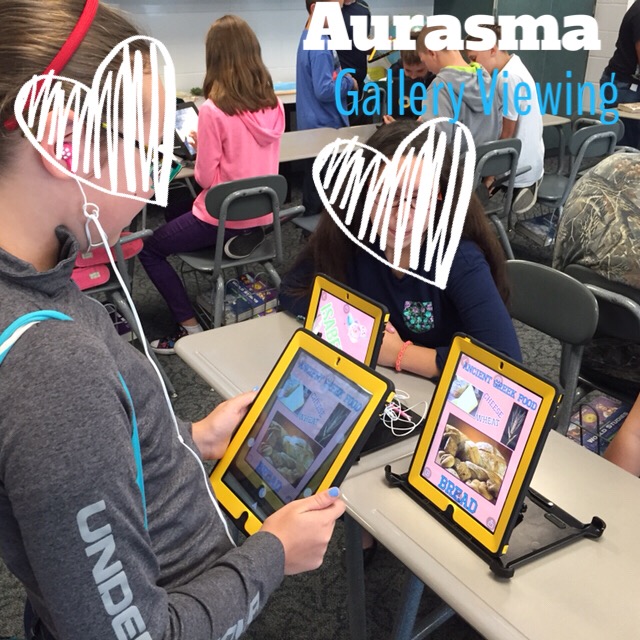
Student Work Galleries- Recently my students completed a multi-step project that required them to create a hands-on Medieval heraldry shield. Their shields served as a “trigger” for a Gami created by the Tellagami app.  In the Gami (a brief, animated video), students had to describe their shield’s symbols and motto.  These shields will now hang above their lockers for the remainder of the year and other students can scan them with the Aurasma app to learn more about their friends’ shields.  Apply this in your own classroom when your students create any sort of video project!  All they need to do is create a visual trigger that their audience can scan.  This is similar to QR code galleries, but with a much cleaner (and way cooler) effect.  My first grade daughter recently created an iMovie trailer for her favorite book as well as a persuasive poster enticing others to read it.  Her poster would make a GREAT trigger for her iMovie trailer!

Scavenger Hunts-  For an upcoming activity, my social studies students will learn about some really important Medieval kings...straight from their mouths.  Well maybe not exactly, but it will sure seem that way!  Using the ChatterPix app, you can take any image and make it “talk.”  For this project, I will be using the images of famous Medieval kings who will be reciting a brief bio about themselves. These short, 30 second video clips can now serve as your augmented reality overlays. Place augmented posters around the school building and watch as your students can’t wait to find out what information they will learn next!  (Recently you may have seen this technique if you follow Principal Gerry Brooks on YouTube!)


Flipped Learning Assistant- Whether you’re a big-time flipper or not, augmented reality can open a whole new world of assistance for your students at school or at home.  Math can always be a tricky subject for parents and students alike.  A math activity sheet can very easily become a trigger for helpful math, how-to videos created by you for your students.  For example, if you’re working on elapsed time, create an image on your activity sheet that when scanned will show students and parents how to solve an example elapsed time problem.  This takes flipped learning to a new level as students will WANT to scan those images for your videos. This eliminates the student excuse of having extra steps to access flipped video content.  You’re welcome.


This Digital Learning Day (and beyond), how will you augment your students’ reality?